This page provides more information about our recent request to re-confirm your membership of the UK-Med Register.
You can find detailed self-assessment guidance here.


This page provides more information about our recent request to re-confirm your membership of the UK-Med Register.
You can find detailed self-assessment guidance here.
Over the past two years, UK-Med has responded to an increased number and range of humanitarian contexts, including natural disaster, disease outbreak and conflict. To meet these challenges we build our response teams in a way that ensures the right mix of clinical and contextual expertise.
Given the scale and complexity of contexts UK-Med now works in, we are at the stage where we are asking you to submit further information on the roles you can undertake, and the contexts you are experienced or comfortable deploying into. This information is vital for ensuring that we can effectively staff our responses; maintain resilience in the UK-Med Register; and to maximise your chances of deploying with us.
Specific ways this information is used include:
The minimum expected time commitment for a UK-Med member is as follows:
Yes – we rely on being able to search by role information when identifying candidates for our responses, including members who can undertake multiple roles.
By providing comprehensive and current information about the roles you can perform, as well as contexts that you are willing or have experience working in, you are more likely to be identified and considered for a response that you are suitable for.
We will ask you to review and update your information at the following times:
You should also periodically review and update your information throughout the year, to ensure that we are not holding incorrect or outdated information about you.
Please make sure to upload an updated copy of your CV either before or alongside updating your role and technical skill information – we will refer to this when assessing your submissions and may assess them as ineligible without this to review.
If we don’t receive a response from you then we’ll assume that you are no longer interested in being a part of the UK-Med Register and will update your record accordingly. You will not receive future communications for the UK-Med Register, such as approaches for availability to deploy, the on-call rota or training opportunities.
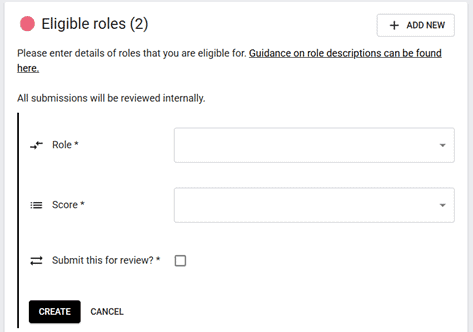
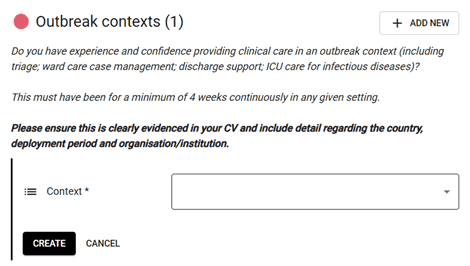
Yes, your submissions about your eligible roles and skills and experience will be reviewed internally. Submissions which cannot be verified will be removed from your record.
Yes, you will receive an automated email alert notifying you that your information has been reviewed. You will need to log-in to the membership portal for details of the outcome.
Please contact our Deployment Readiness team for support with deleting entries.
Please refer to the guidance linked within the portal webpage. If you are still encountering issues updating your information via the portal, please contact our Deployment Readiness team.
Our membership portal works using the security of your email account, so there’s no separate password required: simply enter your email address when prompted and you will receive an email with instructions on how to review your information.
If your email address isn’t accepted, you might have used a different email address to sign-up with us.